
BIM Coordination: How Clash Detection Improves Construction Projects
Construction projects are becoming increasingly complex. Modern buildings involve multiple disciplinesincluding architecture, structural engineering, HVAC, plumbing, electrical systems, fire protection, and specialized building services. When these systems are designed independently, conflicts can easily occur during construction.
Building Information Modeling (BIM) allows project teams to combine discipline-specific models into a coordinated digital environment, identify conflicts before construction, and resolve issues before they become expensive site problems.
In this guide, we explore what BIM coordination is, how clash detection works, its benefits, common types of clashes, and how it improves construction project delivery.
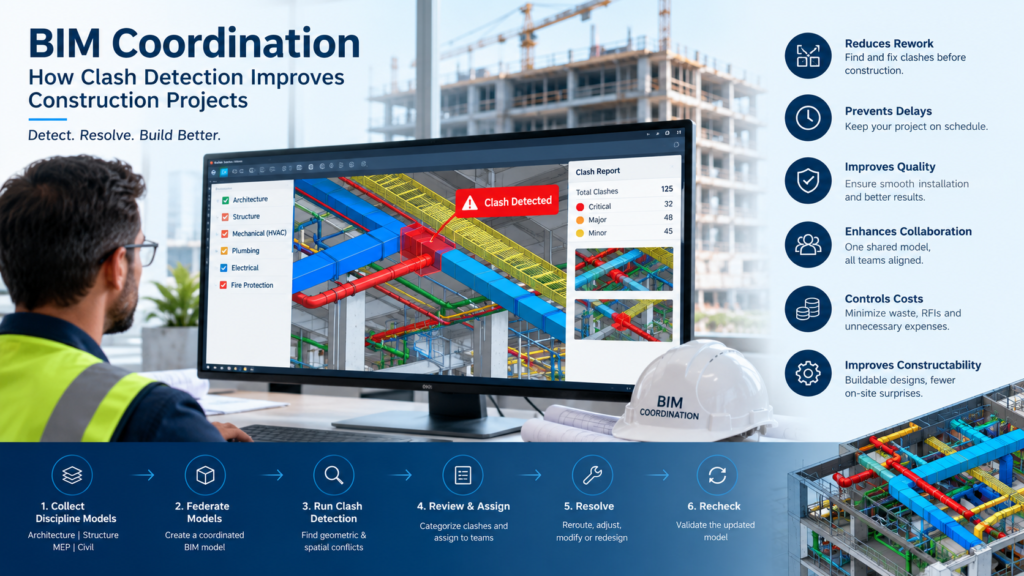
What Is BIM Coordination?
BIM coordination is the process of integrating and reviewing BIM models from different disciplines to ensure that building components work together correctly.
For example, an MEP team may design HVAC ducts, electrical cable trays, and plumbing systems independently. Meanwhile, the structural team develops beams, columns, slabs, and other structural elements.
Without coordination, these systems may occupy the same physical space.
BIM coordination brings these models together so teams can identify and resolve conflicts digitally.
Typical disciplines involved in BIM coordination include:
- Architectural BIM
- Structural BIM
- Mechanical BIM
- Electrical BIM
- Plumbing BIM
- Fire protection
- HVAC systems
- Civil and infrastructure
- Specialist systems
What Is Clash Detection in BIM?
Clash detection is the process of identifying geometric or spatial conflicts between different building elements within a coordinated BIM model.
For example:
- An HVAC duct passes through a structural beam.
- A pipe conflicts with an electrical cable tray.
- A sprinkler pipe interferes with a ceiling system.
- An equipment maintenance zone is blocked by another service.
- A door conflicts with an MEP installation.
- Multiple services occupy the same ceiling space.
These problems can be detected in the BIM environment before installation begins on-site.
Instead of discovering the problem after construction starts, project teams can identify the issue during the design and coordination stage.
How Does BIM Clash Detection Work?
A typical clash detection workflow involves several stages.
1. Collect Discipline Models
The first step is to collect BIM models from the different project teams.
For example:
Architectural Model + Structural Model + MEP Model + Civil Model
Each discipline may develop its model using different software or workflows.
2. Combine the Models
The individual models are brought together into a federated BIM model.
This creates a coordinated digital representation of the project.
The combined model allows the BIM coordination team to examine relationships between different disciplines.
3. Run Clash Detection
Coordination software can compare model elements and identify potential conflicts.
Commonly used tools include:
- Autodesk Navisworks
- Autodesk Revit
- Solibri
- Autodesk Construction Cloud
- BIMcollab
The software identifies elements that intersect or violate predefined coordination rules.
4. Classify the Clashes
Not every detected clash requires the same response.
Clashes can be categorized based on severity and type.
For example:
Hard Clash
Two physical elements occupy the same space.
Example:
A duct intersects a structural beam.
Soft Clash
An element violates a required clearance or tolerance.
Example:
An HVAC unit has insufficient maintenance clearance.
Workflow or 4D Clash
A conflict occurs because of construction sequencing or access requirements.
Example:
A construction activity requires access to an area that is blocked by another scheduled installation.
5. Assign Issues to the Responsible Team
Each clash should be assigned to the appropriate discipline.
For example:
Clash: HVAC duct vs structural beam
Responsible teams: Structural + Mechanical
The teams can then review the issue and determine the appropriate solution.
6. Resolve the Clash
Possible solutions may include:
- Rerouting ducts
- Moving pipes
- Adjusting cable tray elevations
- Modifying structural openings
- Changing equipment locations
- Revising ceiling layouts
- Adjusting service zones
The objective is to resolve the problem while maintaining design intent, constructability, safety, and project requirements.
7. Recheck the Model
After modifications are made, the updated models are coordinated again.
This creates an iterative workflow:
Model → Detect → Review → Resolve → Update → Recheck
The process continues until the project reaches the required coordination level.
Conclusion
BIM coordination and clash detection are essential components of modern digital construction.
By combining architectural, structural, and MEP models into a coordinated environment, project teams can identify conflicts, improve constructability, reduce rework, minimize delays, and improve collaboration.
The real value of clash detection is not simply finding clashes—it is finding and resolving problems before they become construction problems.
As construction projects become more complex and multidisciplinary, effective BIM coordination will continue to play a critical role in delivering projects with greater accuracy, efficiency, predictability, and cost control.
Frequently Asked Questions
1. What is BIM coordination?
BIM coordination is the process of combining and reviewing models from multiple disciplines to identify and resolve design and construction conflicts.
2. What is clash detection in BIM?
Clash detection is the process of identifying conflicts between building elements, such as ducts, pipes, cable trays, beams, walls, and equipment.
3. Which software is used for BIM clash detection?
Common tools include Autodesk Navisworks, Revit, Solibri, BIMcollab, and other coordination platforms.
4. What are the main types of BIM clashes?
The major categories are hard clashes, soft clashes, and workflow or sequencing-related clashes.
5. How does clash detection reduce construction costs?
It identifies conflicts before construction, helping reduce rework, material waste, labor inefficiency, RFIs, and project delays.
6. Is BIM coordination only useful for MEP projects?
No. BIM coordination is useful across architectural, structural, MEP, civil, infrastructure, industrial, and other construction disciplines.
7. What does a BIM Coordinator do?
A BIM Coordinator manages model federation, clash detection, issue tracking, coordination meetings, model reviews, and clash resolution across project disciplines.
8. When should clash detection be performed?
Clash detection should be performed throughout the design and construction coordination process, not only immediately before construction.
9. What is a federated BIM model?
A federated model combines separate discipline models into a single coordinated environment without necessarily merging them into one native model.
10. Can BIM coordination improve project schedules?
Yes. By identifying coordination issues before site installation, BIM coordination can reduce disruptions and support smoother construction sequencing.
Contact Us
Phone : +91 70301 51694
E-mail : contact@matrix-designs.com
Hey there, I have been searching for a smooth and hassle free login experience and this place really delivers every time. The interface feels so welcoming and the games load super quick on my phone. Love how easy it is to jump right into the action without any annoying delays. minion88login
As a local football fan this platform understands exactly what we need from a betting site. The Naira transactions are super fast and the odds for Premier League matches are always competitive. I have never dealt with a more straightforward withdrawal process in my life. ngbet9ija